Next Gen?

I participated in the transition from the PS2/Xbox generation of consoles to the PS3/Xbox 360 generation we are in right now. It was a very tough transition for us. We pretty much threw out the old Madden engine and created a new one from scratch. There were some systems that stayed, but the whole art pipeline was completely changed, which included the animation system. The game play for modern 3D games are pretty much animation driven.

It is now 5 years since Xbox 360 debuted and there is no next generation of consoles in sight. However, there has been a lot of movement in mobile gaming. I remember when the nGage came out and everyone laughed. Now it seems they were just a little ahead of its time. The amount of games that are coming to the iPhone is staggering.

Now I’ve read this rumor on Gamespot that Apple might be planning TV-based gaming through their Apple TV product. Could Apple try and force their way into the space that has been pretty much dominated by Nintendo, Sony, and Microsoft? We’ll see, but it’s an intriguing thought.

Of coarse, our philosophy at EA is to build games for any platform. However, it does make it very difficult when the hardware is vastly different from one another.

Road to Alpha

I came back to the NCAA team at an interesting point in our development cycle. It’s the tail end of Production and we are only 6 weeks away from declaring the product Alpha. For Electronic Arts, Alpha is Feature Complete: all new features that have been implemented and a certain level of stability exists with the game.

Throughout Production we are writing requirements that we call Tests for Completion (TFCs). It is the expectation that the developers who are creating the feature, whether they are artists, designer, or programmer, make sure that they feature they are working on fulfills these TFCs. At the end of our sprints, all the TFCs we commit to at the beginning of the sprint need to pass a review by our QA department. Invariably not all of them get complete and if any of them miss, we try and get them complete as soon as possible right after the end of the sprint. However, sometimes there’s a few that slip even more beyond that sprint and can start hitting up against Alpha. In order for our QA department to declare the game Alpha, all TFCs must be 100% complete.

In order to give us some buffer room, we designate two sprints as “contingency”. Those two sprints are not included in the scope of the project. The two sprints are: one right before the Holiday break (late December) and the other one right before Alpha. We choose late December because there are a lot of developers that like to take extra time off around the break. Overall, these two sprints give us some time in order to iterate on features and hit Alpha on time.

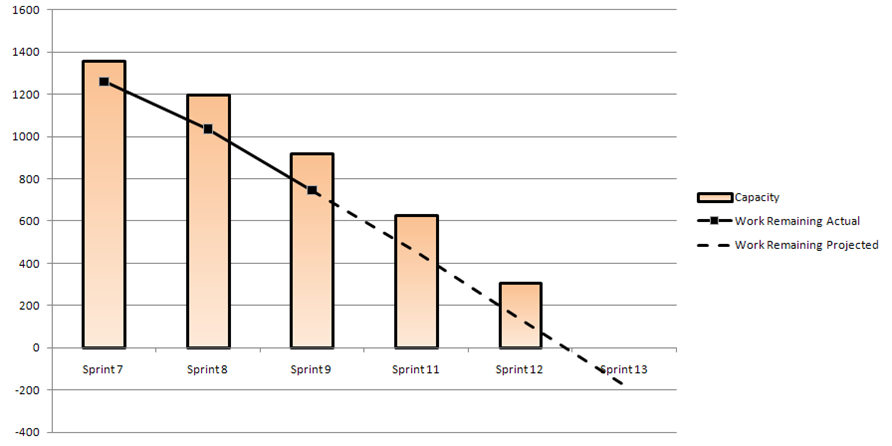
NCAA Football is divided into four sub-teams, we call Pods. Coming onto the team three weeks ago, I’m pretty much taking up the charge to Alpha. My first thought was, “Will each Pod make it to Alpha?” The team had what they called a Master Burndown, which combined the points and velocity of all the Pods. This is great, but all it only takes one feature to hold up Alpha. So, I used some of the techniques I talk about in my Hansoft Basics presentation, to calculate a per-Pod velocity based on data in Hansoft. That ended up giving me data that we were probably going to be booked around a week and a half into the final contingency sprint. Good, but not great.

From this point going to Alpha, we have to keep a very close eye on things that are changing on the backlog. Figure out what is being added and what is being removed. It’s delicate balancing act of wanting to get as many features into the product as possible, quality of the product, and the number of hours we are going to have to crunch during Alpha. I’m hoping we come out completely balanced.

FIEA – Hansoft Basics

On Friday, I gave a talk about Hansoft and some examples how you could use Hansoft to track a project using iterative development. Below is the slides from the talk. The emphasis was put on scoring each sprint, calculating a velocity, and then using that velocity to predict if you can finish on time. If you have any questions, contact me or leave a comment.

Happy New Year

Hope everyone had a save New Years Eve celebration. 2010 is history and here comes 2011. We are busy working on Madden & NCAA at Tiburon. We are most of the way through Production and are about two months away from declaring Alpha on both products. We usually build up and build up and when we get back from holiday break, it’s a big sprint towards the finish line. I equate it to riding a roller-coaster. From August to December, you are clicking up the hill and then once you hit January you are sliding down all the way until ship.

January 2011 also marks my 13th anniversary in the game industry. Back in January 1998, I joined Atomic games. If you haven’t noticed, there’s a new tab / drop-down at the top of the page. This is a series of pages that talk about each game that I’ve made over the years. I’ve only completed Close Combat 3 through Section 8, but I will be putting new ones up Madden Ultimate Team and Madden NFL 11 soon. Each page contains and paragraph talking about what I worked on, the text blurb from the back of each box, screen shots, and if there was a PC demo available, there’s a link to it. For me, its always nice to go back and look over the old stuff and reminisce. If you have any question on what it was like to work on any the games I worked on, drop me a line.

IGDA PechaKucha – Brush with Origin Systems

Last week I spoke at the Orlando IGDA Chapter meeting along with others. The theme was “what the game industry means to you”. I thought this was a good opportunity to tell my Origin story, so to speak (that was a joke). The reason I got into the game industry was my fascination with a game called Ultima and the Austin, Texas based company, Origin Systems. I had many brushes with the company and actually fulfilled a dream to actually work in the same building with them. The presentation is in the PechaKucha format, which is 20 slides that auto-advance every 20 seconds. So, the timing is pretty tricky because you don’t have time to go into too much detail.

Back to NCAA

It’s been a wild year and a half since I’ve returned to Electronic Arts. I started out in EA Tiburon’s Project Management Office. That lasted only a couple of months before I was moved to Madden Ultimate Team. I stuck with the same set of developers as we got the servers for Madden NFL 11 tested and ready for launch, ported Madden Ultimate Team over to Madden 11, and implemented the scouting feature in online games. Once we launched in August, I moved over to our Central Football Gameplay. This group is responsible for the Gameplay for Madden and NCAA Football. I always say they are responsible for “hike to tackle”, but in actuality there’s a little bit more around that.

Well, I’m on the move again. And the job I’m moving to is actually the job I had three years ago. I’m moving back to be the head Development Director on NCAA Football, what Tiburon calls the Program Manager (EA-Canada calls this position Franchise Development Director, which I like better).

As I mentioned in the NCAA team meeting when I was announced as coming back to the team, I’m a big fan of NCAA Football. I’ve been playing it since EA-Tiburon has been making versions of it. So, I’m very excited to be back on that team. Beyond my fandom, I’m also impressed with NCAA’s development practices and I think their long term vision for the franchise is the right direction to go. I will once again be teamed up with Seann Graddy, a Development Director who is now going to be in the “Project Lead” role, or Senior Producer. I’ve worked with Seann in the past on Madden NFL 06 and NFL Head Coach. I’ve always had great respect for Seann and I can’t wait to start my new role.

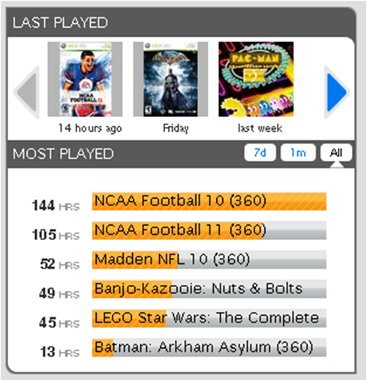
While putting together the presentation that I showed to the team, I put together a list of Football video games that I’ve played over the years. It was a little scary that I’ve been playing these games for almost 20 years now:

  • Front Page Sports Football 93 – 99
  • MS NFL Fever 2000
  • Madden NFL 2001
  • NCAA Football 2002 – 2011

Anyway, I’m excited to be back on the NCAA Football team and the team has evolved over the last three years to a great team that I’m also excited to be a part of.

Personal Productivity – Wiki for Information Storage

There’s a lot of personal data tracking systems out there, but the best I’ve found is a wiki. I’ve tried Microsoft One Note and just keeping individual documents in Word/Excel and Google Docs, but I always come back to a wiki. It’s so easy to just edit a page in order to jot down a quick note. I use my wiki to store bookmarks, lists of books I want to read, and to store my TODO list. I also store information about my web sites, the types of things I only need to reference about once a year and always forget. The wiki is easily searchable and has full edit history so that you can see what you’ve changed over time. I also like how it’s accessible where ever I’m at: work, school or through Safari on my iPhone.

The only downside is that you really need to have a hosted web site, which I happen to have through Frenchville and this site. You need to be able to install the PHP pages and have access to set up a MySQL database. If you are tech savvy enough to do that, then setting up the wiki is easy. Just go over to MediaWiki.org and download the free software. It does require PHP 5.1+, which not all sites support. I used to host my web sites on Yahoo and moved them to my current host, A2 Hosting, because they didn’t support the most up to date PHP. Just follow the instructions on their Download page on how to install and setup the database. It’s pretty straightforward.

You will probably want to protect your wiki from prying eyes. There is a way to make a wiki private. You can change the settings of the wiki so only registered users who are “sysops” can edit the page and only allow certain pages to be visible to unregistered users. This was accomplished by editing the LocalSettings.php page. The following settings were added:

# Prevent new user registrations except by sysops
$wgGroupPermissions['*']['createaccount'] = false;

# Restrict editing by all non-sysop users
$wgGroupPermissions['*']['edit'] = false;
$wgGroupPermissions['user']['edit'] = false;
$wgGroupPermissions['sysop']['edit'] = true;

# Disable reading by anonymous users
$wgGroupPermissions['*']['read'] = false;

# But allow them to read e.g., these pages:
$wgWhitelistRead =  array ( "Main Page", "Special:Userlogin", "Wikipedia:Help");

Hopefully you have the time to try this out. I really enjoy using a wiki for the storage of personal data. It’s the most versatile and malleable to the types of things I like to do. Have any suggestions? Drop me an e-mail.

Personal Productivity – The TODO List

As you’ve been addressing all the things in your inbox, you’ve been either doing the action item if it took less then two minutes or you are writing it down on a TODO list in order to address it later. I like to divide up my TODO list into four sections:

  • Important – Overdue
  • Important – Due Soon
  • Important – Not Due Soon
  • Not Important – Due Soon
  • Not Important – Not Due Soon

This technique I learned from Randy Pausch’s lecture on time management. The key is that you are working on the things that are important first, not the things in “due date” order. It can sometimes be tricky determining if something is “Important or Not Important”. I just use my gut. Sometimes it can be hard because you don’t want to make everything “important” because that defeats the purpose. My definition of “due soon” is 1 week. Also, I use the amount of items on my “Important – Overdue” section and “Important – Due Soon” to determine if I need to work late.

That’s about it. I keep my TODO list on a personal wiki page that I maintain so that I can reference it when I’m at work and when I’m at home. That works for me, but the key is: have a TODO list. If you don’t and you are winging it, you will start to forget things.

Personal Productivity – Inbox Zero

Inbox Zero BadgeAs mentioned in the previous post, you have to know where your “inboxes” are. E-mail, at least at every company I’ve worked for, is a constant source of input: inquires about action items, notification on the status of certain issues, etc. I’m always amazed that most people 1) don’t at least address every e-mail that comes in and 2) use their inbox as the location for all their e-mail. The philosophy of Inbox Zero is that you address every e-mail in your Inbox every day. As you go through, touch every e-mail only 1 time. Once you’ve read it, you either trash it or archive the e-mail. If there’s an action to take from the e-mail, either do it now if under 2 minutes or add it as an action item to your TODO list. At the end of the day (or several times throughout the day) you will keep your Inbox clean and blank of all incoming e-mails. There’s definitely some satisfaction that comes from getting that e-mail box completely clean.

So, you might be thinking, there’s no way I can go through all the e-mail I get. I get hundreds of e-mails per day. Well, so do I and you are right, you can’t possibly read every single e-mail. So, I use Outlook Rules in order to filter e-mail. I have two folders off my Inbox: “Archive” and “Low”. I use Outlook rules in order to filter all e-mail from particular e-mail lists into the “Low” folder. For example, all the e-mail that goes to everyone in the company or everyone in the studio. The likelihood of important action items coming from those lists is very low. If you use Gmail, there is also methods for filtering incoming mail into a particular label or you could probably train the new “Priority Inbox” feature as those types of e-mails come in. Just because e-mail is going to the “Low” folder doesn’t mean I still don’t address them. However, the way I address them is different. I read who is responding to the thread and what the subject is, if I think I should read it, then I read the thread. Otherwise, I just delete it. I don’t bother actually putting much time into an e-mail that’s in the “Low” folder, but the import thing to understand is, something was done with that e-mail: it was deleted. I threat the “Low” folder as another Inbox and it also gets down to zero by the end of the day.

As mentioned, I only have two folders off of my Inbox when I’m using Outlook at work: “Archive” and “Low”. I put any e-mail that I think I might need to reference later into the “Archive” folder and then use Google Desktop to search that e-mail when I’m looking for something. Google Desktop works in the background to index all of your e-mail and quickly sifts through all of it in order to find what you are looking for. At EA, we are only allowed to keep a certain amount of e-mail up on the server, so we have to create a local Outlook E-mail Archive once an e-mail is a couple of months old. Google Desktop indexes across mail on the server and in your archive, which is very handy. At home I use Gmail and I use the “Archive” button for the same thing. This strips the “Inbox” label, but the e-mail is still available through the “All Mail” link on the side of the screen. Gmail has built in search, which is very powerful and has the same keywords as Google Desktop.

The faster you can get through e-mail the sooner you can get to things on your TODO list. One way I help speed myself up is I don’t remove my fingers from the keyboard, I’ve memorized some of the keyboard shortcuts for Outlook. The main ones I use are:

  • <Ctrl>+<Enter> – Send e-mail – I keep the dialog that pops up just in case there’s something I forgot.
  • <Ctrl>+<Q> – Mark as Read
  • <Ctrl>+<Shift>+<V> – Move to folder – Helps in quickly moving a message to the Archive folder.

I haven’t quite memorized the Gmail shortcuts, but they are available.

If you use Gmail as your primary source of e-mail, you might have fun with 0boxer.com. It’s basically a game around getting your e-mail inbox down to zero. You have scoring, badges, and leaderboards all around getting your inbox down to zero. I haven’t personally used it, because I just don’t get that much e-mail through Gmail, but I’ve heard it can be quite fun.

That’s it. Hopefully you have found this useful while you are trying to wade through your e-mail. As before, if you have any more efficient method or a process improvement, leave a comment.

Personal Productivity – Processing Information

One of the keys to making sure you are well organized is knowing where your “inboxes” are. These are the sources for all your action items. For me I have six: my notebook, my work e-mail, my home e-mail, our bug database at work, my physical home inbox, and it’s equivalent at work. The idea is that you process your inboxes throughout the day before moving on to “action items” from your TODO list. Identifying these sources and making sure you are reviewing them throughout the day gives people you interact with a sense of responsiveness.

My notebook is action items that I collect when I’m in meetings or when I’m walking around and think of something I need to do. I idea is, if it’s in your head, get it out of there and onto a piece of paper. Your mind always wants to process things. If you get it off your mind and onto a piece of paper, then your mind is free to think about more important things. I always process my notebook first. When I return to my office. I have found usually the most important action items will get placed in there and it usually best to take action on them immediately.

Another tip on giving people that sense of responsiveness is going ahead and doing an action item if it isn’t going to take that long while you are processing your inboxes. For example, a quick response to an e-mail. The general rule is that if it can be done in under two minutes, then do it now. Otherwise, it needs to either be added to a TODO list in order to get worked on later or archived somewhere so that it can be referenced later.

In future entries I will go into more detail on processing e-mail and how to store information so that it can be searchable later when you are looking for it.

Do you have a more efficient method or a process improvement? Add a comment below!